Key Takeaway: If your Sega CD Model 2 shows "Internal RAM is not initialized," you need to format the RAM before it will play games. It takes about two minutes: remove the disc, restart, access the Control Panel, go to Memory, select Format, confirm Yes, and restart.
Sega CD units nowadays almost always come in with some sort of issue. Nine times out of ten, the console doesn't turn on at all. That's most common with the Model 1, while Model 2 consoles typically suffer from a blown power fuse. If you're reading this, you have the easier fix by comparison.
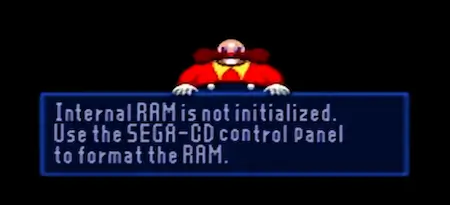
If you see the message "Internal RAM is not initialized. Use the SEGA-CD control panel to format the RAM" on your Sega CD Model 2.
Don't worry; this is a common issue that indicates your console's save memory requires formatting. In this article, you'll learn to spot the issue, format your system, and return to gaming in minutes.
How to Fix the "Internal RAM Is Not Initialized" Error on a Sega CD Model 2
The Table of Contents
How to Tell if Your Sega CD Model 2 Needs a RAM Format
- Insert Your Game Disc – Place the Sega CD game into the console's disc drive.
- Press Start – The game will attempt to load.
- Look for the RAM Error Message – If you see, "Internal RAM is not initialized." Format the RAM using the SEGA-CD control panel; you need to format your system before you can play.
Prefer to watch the process?
Here's a video walkthrough you can follow along with as you format your Sega CD Model 2 RAM.
 ▶
▶
How to Format the Internal RAM on a Sega CD Model 2
-
Step 1
- Remove the disc and restart. Open the disc tray, take out the game, and restart the console.

- Remove the disc and restart. Open the disc tray, take out the game, and restart the console.
-
Step 2
- Access the Sega CD Control Panel. Press Start. You will see the control panel with "No Disc" displayed.
-
Step 3
- Reinsert the game disc. Place the disc back into the drive, but remain in the control panel menu.
-
Step 4
- Open the Memory Menu. At the top of the screen, select Memory and press any button.
-
Step 5
- Select the Format Option. Choose Format for the Console (Internal RAM), then confirm Yes.
-
Step 6
- Wait for "Format Complete"; when you see the confirmation, select Exit.
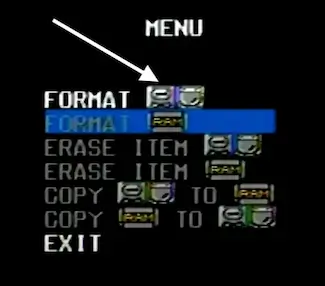
- Wait for "Format Complete"; when you see the confirmation, select Exit.
-
Step 7
- Restart the console and press Start; your game will load as it should.
Sell Old Sega Games & Consoles Here!
Frequently Asked Questions
What does "Internal RAM is not initialized" mean on the Sega CD?
It means the backup save memory was wiped — usually because the internal battery died — or the RAM has never been set up on this unit. The console needs to format the internal RAM before it can play games or save data. This is a common issue on used Sega CD Model 2 consoles and takes about two minutes to fix.
Will formatting the Sega CD internal RAM erase my saves?
Yes. Formatting deletes all data stored in the internal RAM. If you have saves you want to keep, back them up to a Sega CD RAM cartridge before formatting. If you're formatting a used console you just picked up, there's nothing worth keeping and you can proceed without concern.
How do I format a Sega CD RAM cartridge?
From the Sega CD Control Panel, go to Memory, then select Format the RAM Cartridge, then confirm Yes. This wipes only the cartridge memory — it does not affect the console's internal RAM. Use this if your RAM cartridge shows an error or won't load save data correctly.